22/10/2026 04:49
Separate Trays or One Insert? TikTok Photo Descriptions for Cambodian Drawer-Organizer Shops

A drawer-organizer photograph can hide an important distinction: several removable trays may look like one fixed insert. Nested trays can resemble a single container, while utensils used for styling can appear to be included. For a Cambodian homewares shop promoting products through TikTok, these ambiguities deserve attention before any promotion budget is considered. This workflow uses a hypothetical Phnom Penh shop selling modular trays to explain how to plan photographs, write useful alternative text, check the buying information and evaluate panel claims. The goal is a photo post that helps people understand the product, including those using a screen reader, without treating visible engagement as proof of understanding or demand.
1. Start with the question the photograph must answer
Give each photograph a specific job. An overview should establish what the organizer looks like. A separated layout should show which pieces can move independently. A drawer example should demonstrate one possible arrangement. A measurement photograph should explain which edges were measured. Trying to accomplish all of this in one attractive overhead picture often leaves the most useful information unclear.
For the hypothetical shop, the first customer question is whether the product is one molded insert or three separate trays. Photograph the trays with visible space between them before showing them inside a drawer. Keep the same pieces throughout the sequence. If a later image introduces a different size or color, identify that change rather than letting viewers assume every photograph shows the same package.
2. Understand the role of TikTok photo alt text
TikTok’s official accessibility announcement confirms that creators can add alternative text to photo posts during upload or after publishing. Alt text gives a written description of visual information for accessibility, including screen-reader use. For this workflow, it should explain the product’s visible structure and arrangement. It is not a place to repeat promotional slogans or insert a list of search keywords.
Prepare descriptions alongside the selected photographs, then look for the alternative-text option in the photo posting or editing controls available in your app. Match each description to its corresponding image and check that it saves. The official announcement establishes the feature, but it does not justify assuming that every device presents identical menus. If you cannot locate the control, consult TikTok’s current help guidance rather than guessing through unrelated settings.
3. Describe the relationship between the pieces
Begin with the object, then explain the detail that changes interpretation. In a hypothetical separated-tray photograph, a useful description could be: “Three rectangular organizer trays lie separately on a counter: one long cream tray and two smaller teal trays.” This establishes that the pieces are separate and gives enough visual detail to distinguish them.
For a hypothetical nesting photograph, write: “Two smaller trays sit inside a larger rectangular tray, with their rims visible above its base.” Do not call that arrangement three compartments unless the photograph actually shows compartments. Words such as nested, stacked, beside and inside describe different relationships. Choose the one the image supports. Avoid describing an unseen locking mechanism or claiming the pieces connect merely because they touch in the photograph.
4. Separate visible contents from the sales package
A photograph can show objects that are not part of the offer. Pens, spoons, keys and drawer liners may help demonstrate use, but their presence does not establish what the buyer receives. Describe relevant props accurately in alt text, and state package contents clearly in the public sales caption. Buyers should not need access to an accessibility field to discover an important exclusion.
In the hypothetical shop’s caption, a suitable clarification would be: “The set contains the three empty trays shown separately. Utensils and the wooden drawer are demonstration props.” That statement would be appropriate only after checking the actual package. If the business sells individual trays as well as sets, identify which offer the post concerns. A photograph of three items should never silently become an offer for just one.

5. Make fit information verifiable
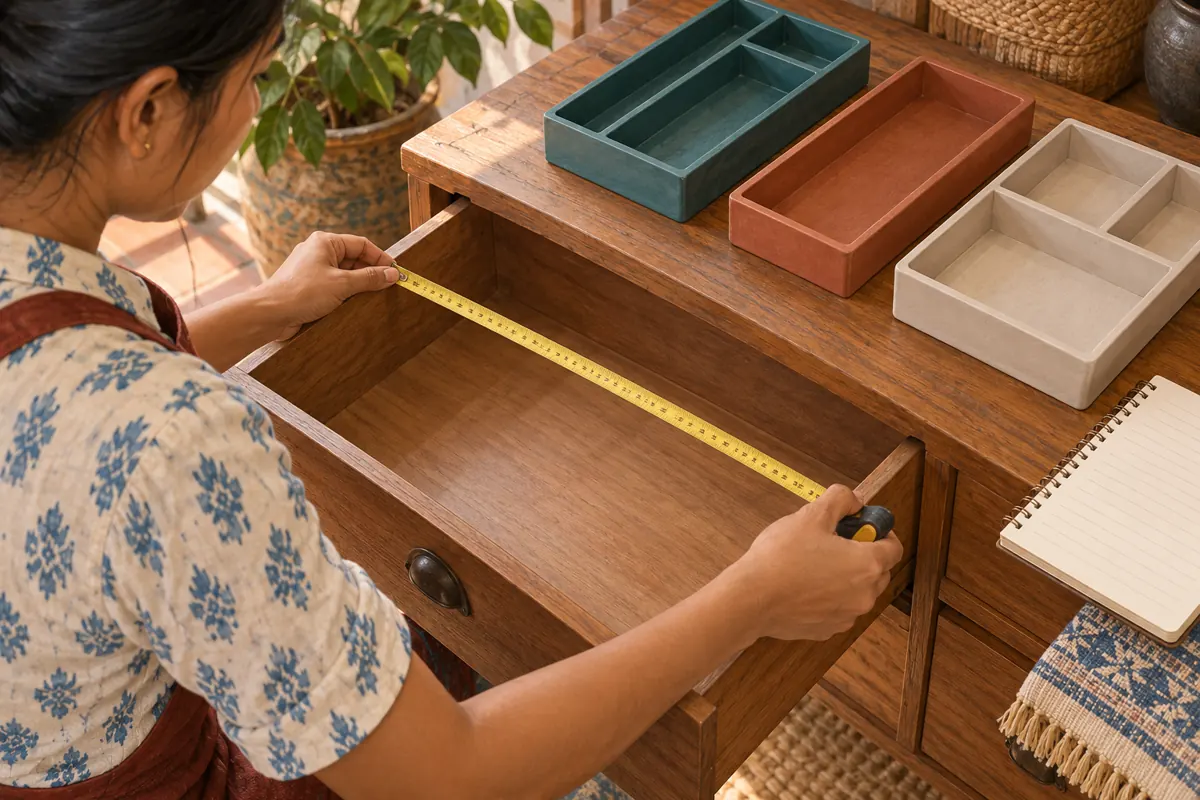
An organizer that looks comfortable in the shop’s demonstration drawer may not fit a customer’s drawer. Measure the product separately and identify whether a quoted measurement refers to the outside rim or usable interior. For the drawer, check the internal space and any obstruction that affects placement or closing. Do not use the apparent proportions of a photograph to estimate dimensions.
If a measurement image contains essential written dimensions, include those values and their meaning in accessible text, after checking them against the product. Use explicit units rather than an unexplained sequence of numbers. A photo description can explain that a tape spans the drawer’s inside width; the caption can provide verified product dimensions and the next step for checking fit. Avoid a universal-fit claim based on one successful demonstration.
6. Choose language for the actual audience
For a Cambodian shop serving mainly Khmer-speaking customers, prepare the customer-facing descriptions in clear Khmer and have a fluent reader review the product terms. This English workflow does not require the shop to switch its own content language. If the business also serves English-speaking customers, decide where a second-language explanation will help rather than automatically doubling every description.
Pay particular attention to the difference between a removable tray, an internal divider and a complete drawer insert. Maintain a small approved vocabulary so the caption, photographs and staff replies refer to the same objects. Read measurements aloud during review: a shortened unit or product code may be understandable on screen but awkward when spoken. Keep necessary model codes, while adding ordinary words that explain what the code identifies.
7. Review each image without relying on the previous one
Give every selected photograph enough context to make sense when encountered individually. “Another angle” says little about the product. A more useful description identifies the new detail: “Side view of the shallow cream tray, showing its raised rim.” Repeating the entire first description is unnecessary, but omitting the subject makes the sequence harder to follow.
Before saving the post, compare image order with description order. Rearranging photographs can create a mismatch if the team manages descriptions in a separate document. Check the final crop too: a description that mentions all three trays becomes inaccurate if one is cropped out. Keep a simple internal pairing of the final image and approved text so a colleague can verify the match without reconstructing the editing history.
8. Use a listening review to find missing meaning
Ask a colleague to listen to the draft descriptions without seeing the photographs, then explain what they think the product is. Can they distinguish separate trays from fixed compartments? Do they understand which photograph shows nesting? Can they tell whether utensils are merely visible props? Their answers reveal ambiguities that a visual proofread can miss.
Where possible, also check the saved post using the phone’s screen reader. A colleague reading text aloud can review wording, but that alone does not test how the app exposes it. Avoid treating a brief simulation as a substitute for feedback from people who regularly use assistive technology. If someone identifies an unclear description, ask which information was missing and revise that detail instead of adding a long catalogue of decorative features.
9. Assess SMM-panel offers separately from accessibility work
The supplied smm-best.com catalogue includes “TikTok Video Views ~ Max Unlimited ~ 10M/Days ~ Instant ~ 𝐍𝐎 𝗥𝗘𝗙𝗜𝗟𝗟”. Its name identifies a video-view offering, while its supplied description is empty. That does not establish compatibility with photo posts, audience location, delivery performance or any accessibility benefit. Treat wording within the service title as catalogue claims, not independently verified specifications.
TikTok’s Community Guidelines prohibit services that artificially boost engagement or manipulate its recommendation system. A panel listing does not override those rules or establish official platform affiliation. Do not order artificial engagement as a way to validate this photo workflow. Purchased engagement is not evidence of genuine interest, sales, ad delivery or Cambodian users. The useful decision here is to resolve the product communication first and assess any proposed promotional method against platform rules before spending.
10. Give the viewer a practical next step
After explaining the product, invite a question that staff can answer responsibly. For the hypothetical shop, that could mean asking customers to send their drawer’s internal dimensions and identify the tray arrangement they prefer. Explain that staff will check the supplied information before advising on fit. Avoid asking customers to post home addresses or other unnecessary personal details in public comments.
Keep sales information visible and current: package contents, verified dimensions, availability and any applicable collection or delivery conditions belong in the public buying explanation. TikTok’s Community Guidelines also require the content disclosure setting when promoting a product, brand or business. Accessibility descriptions complement these obligations. They do not replace accurate sales terms or the platform’s commercial disclosure controls.
11. Review confusion rather than chasing a counter
After publication, record the questions the post generates. Separate questions about tray count, fit, color, included items and collection. Repeated confusion about removable pieces suggests a different fix from repeated questions about availability. Change the photograph when the structure is hard to see; change the description when the image is clear but its written explanation is incomplete.
In a hypothetical review, the team might find that people understand the three-piece set but still cannot tell whether the tall tray allows a drawer to close. The next useful asset would show and explain height clearance. That is a content decision based on an observed question, not a claim that alt text increased sales. Keep enquiries and confirmed orders separate, and do not attribute either to a single edit without supporting evidence.

Frequently asked questions
Should alt text repeat the whole sales caption?
Usually it should focus on the image’s useful visual information. A caption may explain availability, package contents and how to enquire, while alt text explains the arrangement or detail shown. Some overlap is reasonable when necessary for understanding, but repeating a long sales message can bury the photograph’s meaning.
Can we use the same description for every tray photograph?
Only if the images convey the same information, which may indicate that the sequence itself needs editing. A separated layout, nesting example and side view each answer a different question. Describe that difference so a person listening to the post receives the reason for including each photograph.
What if a photograph contains a price or measurement label?
Make essential information available as text and check it against the actual offer. Explain what a measurement refers to, including its unit. Do not leave important buying conditions only inside an image, and do not copy an outdated label into a new description simply because it appears in the photograph.
Can an automatically suggested description be accepted without review?
Review any suggestion against the actual image and product. A description may recognize containers while missing that they are removable, nested or sold separately. The business remains responsible for the meaning it publishes. Correct unsupported material claims, counts and relationships before using suggested wording.
Will better alt text increase reach or make panel views more valuable?
This workflow makes no reach guarantee. Its purpose is to communicate visual information more accessibly and accurately. It cannot turn purchased engagement into buyer intent or prove that viewers are Cambodian. Assess clarity through specific feedback and questions, while evaluating promotional methods separately against TikTok’s rules.
Explore the current service catalogue, create an account, or ask a specific question through support tickets.
- TikTok: Celebrating Global Accessibility Awareness—Building an Accessible and Inclusive TikTok
- TikTok Community Guidelines: Overview, Deceptive Behavior and Commercial Disclosure
Prepared with AI assistance. Illustrations explain the workflow and do not represent customer results.